Tech Revenue Brief
Creator Business

How to Build a Prompt Library for Your Publishing Team

Learn how to build a prompt library for your publishing team to enhance creativity and efficiency. Follow these actionable steps for success.

Start Here

TL;DR

  • Identify the purpose and gather team input for your prompt library.
  • Choose an effective tool like Notion for collaboration and organization.
  • Regularly update the library to keep it relevant and useful.

Plain English

What this means

Identify the purpose and gather team input for your prompt library. This briefing is written for operators who want a fast read first, then a practical plan—not a generic news recap.

creator-business briefing

Audience

Who should care

  • Creator Business operators evaluating their next move
  • Founders and publishers who need a decision framework, not more hype
  • Teams turning search demand into pages, tools, or offers

Scan Path

Answer first, details second

Trust Cue

Source linked for verification

Time Cost

3 min read

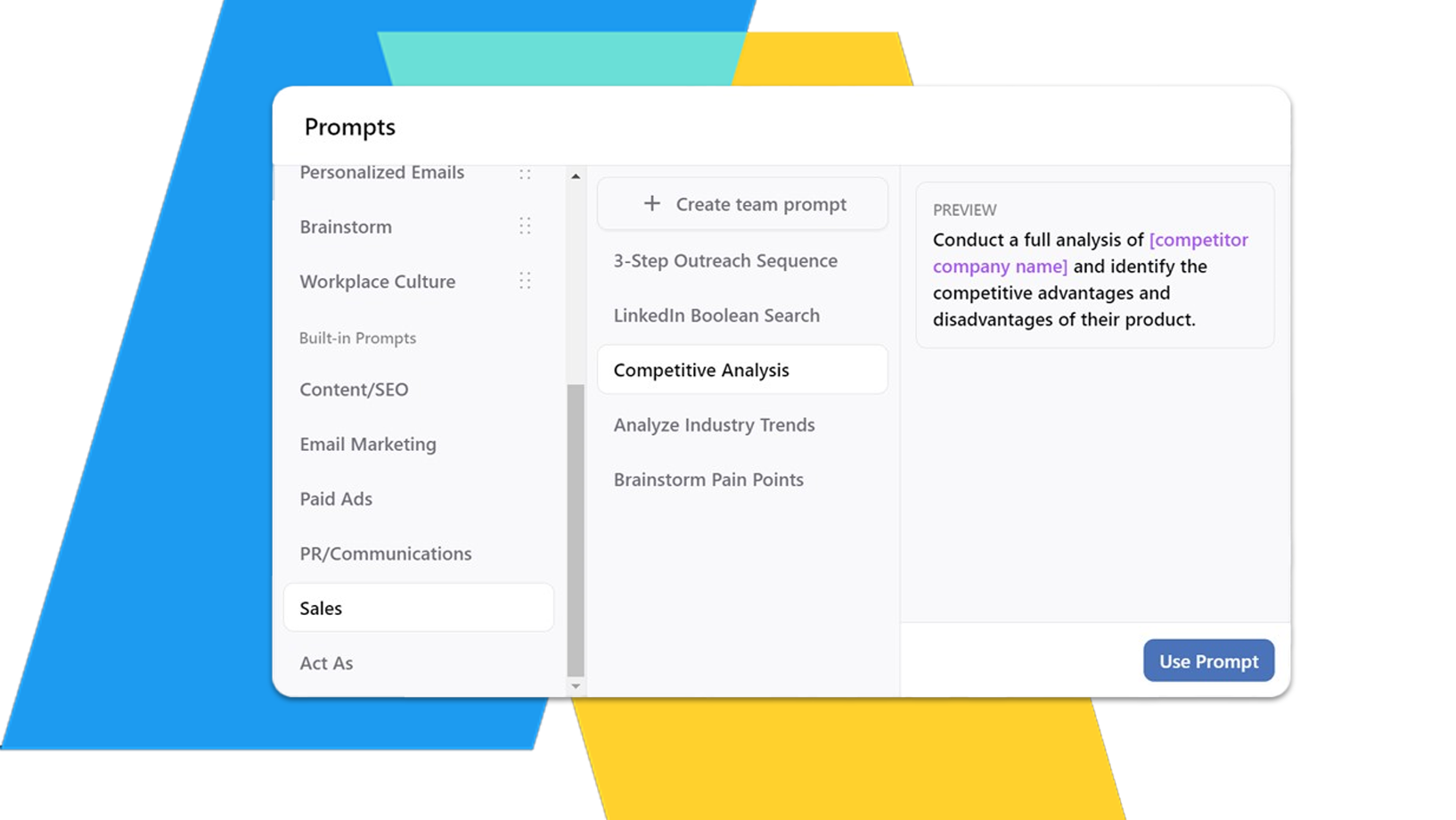
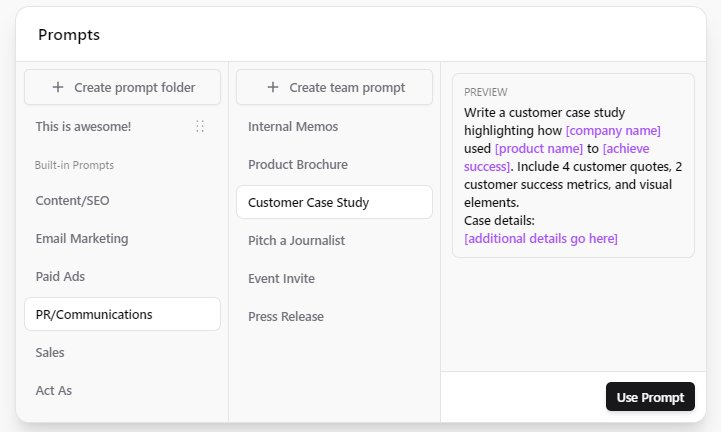
Creating a prompt library for your publishing team can significantly enhance creativity and efficiency. This guide will walk you through the steps to build a functional and effective prompt library tailored for your team’s needs.

Quick Answer

To build a prompt library for your publishing team, start by identifying the types of prompts you need, choose a suitable tool (like Notion or a shared document), and organize the prompts into categories. Regularly update the library to keep it relevant and useful.

Step-by-Step Workflow

  1. Identify the Purpose: Determine what you want to achieve with your prompt library. Is it for brainstorming, content outlines, or FAQs? This will guide your prompt selection.
  2. Gather Input: Involve your team in the process. Collect suggestions for prompts they find useful or would like to see included.
  3. Choose a Tool: Select a platform to host your prompt library. Options like Notion or Google Docs work well for collaboration.
  4. Organize Prompts: Create categories based on type, such as Outlines, FAQs, Internal Links, and Tone Suggestions. This makes it easier for team members to find what they need quickly.
  5. Create and Format Prompts: Write clear, concise prompts. Ensure they are actionable and specific. For example, instead of "Write about tech trends," use "Outline the top 5 tech trends for 2024."
  6. Review and Revise: Regularly review the prompts with your team. Remove outdated prompts and add new ones based on current needs or feedback.
  7. Train Your Team: Conduct a session to introduce your team to the prompt library. Show them how to use it effectively and encourage them to contribute.
  8. Maintain the Library: Schedule regular updates (e.g., quarterly) to keep the library fresh and relevant. Solicit ongoing feedback from the team to improve it.

Common Mistakes

  • Neglecting Team Input: Failing to involve your team can lead to a library that doesn’t meet their needs.
  • Overcomplicating Organization: Keep categories simple; too many can overwhelm users.
  • Ignoring Updates: An outdated prompt library can become irrelevant, so make sure to revisit it regularly.

Checklist for Building a Prompt Library

  • [ ] Define the purpose of the library.
  • [ ] Collect input from team members.
  • [ ] Choose a collaborative tool.
  • [ ] Organize prompts into clear categories.
  • [ ] Write actionable and specific prompts.
  • [ ] Schedule regular reviews and updates.
  • [ ] Train the team on how to use the library.

FAQ

What is a prompt library and why is it important? A prompt library is a collection of writing prompts designed to inspire and guide content creation. It enhances creativity and streamlines the content development process.

How do I start building a prompt library? Begin by identifying your goals, gathering team input, and selecting a suitable tool for collaboration.

What types of prompts should be included in a library? Include prompts for outlines, FAQs, tone suggestions, and other relevant categories tailored to your team’s needs.

How can a prompt library improve team collaboration? By providing a centralized resource of ideas, it encourages team members to contribute and collaborate more effectively, leading to enhanced creativity and productivity.

Building a prompt library is a strategic move that can significantly enhance your publishing team’s output and creativity. By following these steps, you can create a resource that is both useful and inspiring.

Source: Tech Revenue Brief Editorial.

Tools mentioned in this guide

- Notion vs Airtable

Operator take

What we would do

We would protect audience trust first. Monetization that hurts open rates or engagement usually costs more later.

Example

Example: newsletter operator testing sponsorship pricing

Setup

12k subscribers, 42% open rate, one sponsor slot per issue.

What we would do next

Price on engaged readers and click-through to offers—not raw list size alone.

Action plan

What we would test first

  1. 1Define the one decision this article should help the reader make.
  2. 2Add a concrete example with numbers, even if approximate.
  3. 3Link to one tool, one comparison, or the contact form for help.

Watch out

Mistakes to avoid

  1. 1Publishing a summary without a clear recommendation or next step.
  2. 2Chasing every related keyword instead of one primary page job.
  3. 3Ignoring Search Console or analytics when the topic is search-driven.

Next steps

Turn this into action